Generate Chat Response Azure OpenAI
RCA.Activities.AIServices.GenerateChatResponseAzureOpenAI
Description
The Generate Chat Response Azure OpenAI activity generates a chat response using an Azure OpenAI model based on user prompts, optional file or image input, and conversation history. This activity must be used inside an AI Scope with Provider Type set to AzureOpenAI.
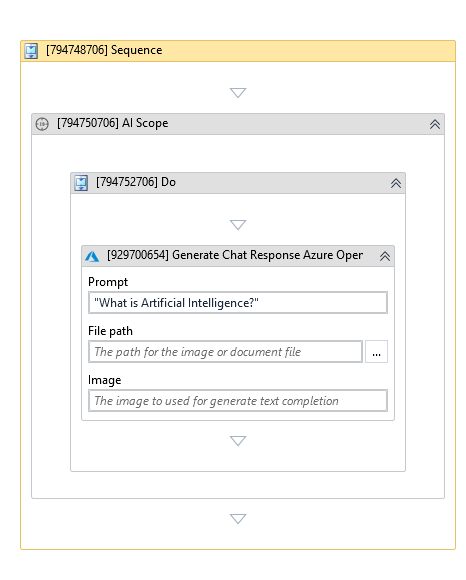
(* is mandatory)
In the body of activity
- Prompt - The input prompt used to generate the Azure OpenAI chat response.
- File Path - Optional file path used as input for generation.
- Image - The image object used to generate the Azure OpenAI chat response.
Properties
Common
- Continue On Error (Boolean) - A Boolean variable has two possible values: True or False
- True : allows the rest of the process to continue the execution even an error occurs within the activity.
- False : blocks the process from continuing the execution. - Timeout MS (Int32) - The maximum amount of time (in milliseconds) to wait for the activity to complete before an error is thrown. Default value: 30000 (milliseconds).
E.g: 30000
Input
- File Path (String) - Path for the file used to generate response, including common image files (JPEG, PNG, WEBP) and document files (PDF, TXT).
- Image (Image) - The input image object used to generate response.
- Prompt (String)* - The input prompt for the chat response.
Options
- Instruction (String) - A system-level instruction for the AI model to follow throughout the conversation. It is added once at the beginning of the AI Scope conversation history.
- Max Output Tokens (Int32) - The maximum number of tokens to generate. Default value: 1920.
- Reasoning Effort (String) - For gpt-5 and o-series models only. Constrains effort on reasoning. Supported values include none, minimal, low, medium, and high.
- Reasoning Summary (String) - For gpt-5 and o-series models only. Summary mode for the reasoning performed by the model. Supported values include auto, concise, and detailed.
- Summarization Message Threshold (Int32) - Message count threshold that triggers conversation summarization. Default value: 15.
- Summarization Token Threshold (Int32) - Token threshold that triggers conversation summarization to save tokens for future turns. Default value: 3000.
- Temperature (Double?) - Randomness of the response, ranging from 0.0 to 2.0. Higher values create more creative responses, while lower values are more deterministic. Defaults to 1.0.
- Top P (Double?) - Nucleus sampling value. Consider changing this or Temperature, but not both. Defaults to 1.
Output
- Full Response (JObject) - The full response from the service.
- Result (String) - The result of the model.
Misc
- Public (Checkbox) - Check if you want to public the activity. Remember to consider data security requirement before using this property.
- Display Name (String) - The name of this activity. You can edit the name of the activity to organize and structure your code better.
E.g: Generate Chat Response Azure OpenAI