Generate Chat Completion
RCA.Activities.AIServices.GenerateChatCompletion
Description
The Generate Chat Completion activity generates a chat completion response using an OpenAI model based on user prompts. This activity must be used inside an AI Scope with Provider Type set to OpenAI.
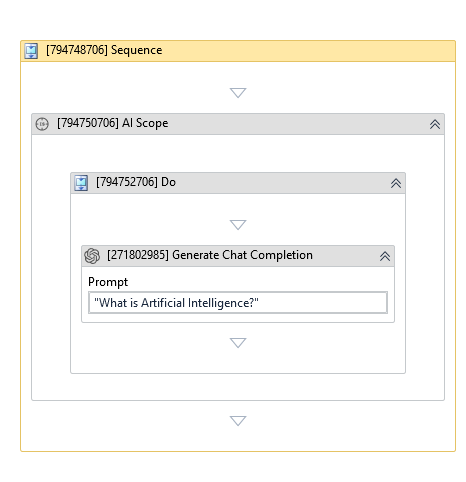
(* is mandatory)
In the body of activity
- Prompt - The input prompt used to generate the chat completion.
Properties
Common
- Continue On Error (Boolean) - A Boolean variable has two possible values: True or False
- True : allows the rest of the process to continue the execution even an error occurs within the activity.
- False : blocks the process from continuing the execution. - Timeout MS (Int32) - The maximum amount of time (in milliseconds) to wait for the activity to complete before an error is thrown. Default value: 30000 (milliseconds).
E.g: 30000
Input
- Prompt (String)* - The input prompt for the chat completion.
Options
- Best Of (Int32?) - Generates multiple completions server-side and returns the best one. Must be greater than N when used with N. Defaults to 1.
- Echo (Boolean?) - Echoes back the prompt in addition to the completion. Defaults to False.
- Frequency Penalty (Double?) - Number between -2.0 and 2.0. Positive values reduce repeated text. Defaults to 0.
- Instruction (String) - A system-level instruction for the AI model to follow throughout the conversation. It is added once at the beginning of the AI Scope conversation history.
- Log Probabilities (Int32?) - Includes the log probabilities on the most likely output tokens.
- Max Tokens (Int32) - The maximum number of tokens allowed for the prompt and generated answer. Default value: 1920.
- N (Int32?) - Number of completion choices to return. Defaults to 1.
- Presence Penalty (Double?) - Number between -2.0 and 2.0. Positive values increase the likelihood of new topics. Defaults to 0.
- Stop (String[]) - Up to 4 sequences where the API will stop generating further tokens.
- Stream (Boolean?) - Whether to stream back partial progress. Defaults to False.
- Suffix (String) - The suffix that comes after a completion of inserted text.
- Summarization Message Threshold (Int32) - Message count threshold that triggers conversation summarization. Default value: 15.
- Summarization Token Threshold (Int32) - Token threshold that triggers conversation summarization to save tokens for future turns. Default value: 3000.
- Temperature (Double?) - A number between 0 and 2. Higher values produce more random output, while lower values make it more focused. Defaults to 1.
- Top P (Double?) - A number between 0 and 1. The lower the number, the fewer tokens are considered. Defaults to 1.
Output
- Full Response (JObject) - The full response from the service.
- Result (String) - The result of the chat completion.
Misc
- Public (Checkbox) - Check if you want to public the activity. Remember to consider data security requirement before using this property.
- Display Name (String) - The name of this activity. You can edit the name of the activity to organize and structure your code better.
E.g: Generate Chat Completion