Write Cell
RCA.Activities.Excel.WriteCell
Description
This activity allows you to write a value or formula into a specified spreadsheet cell or range.
If the sheet does not exist, a new one is created.
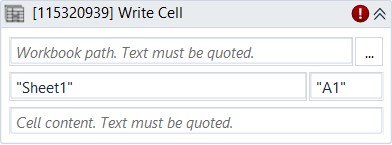
* indicates required fields.
In the Body of Activity
- Workbook Path: The path of the Excel file to use.
Example:"C:\FolderName\ClientList.xlsx" - Sheet Name: The sheet to write data to.
Example:"ClientNames" - Cell Content: The value or formula to write into a cell or range. Only string variables, generic variables, and strings are supported.
Example:"Hello world"or"=A2&A3" - Cell: The cell to write to. Only string values are supported.
Example:"A20"
Properties
Input
- Workbook Path (String)*: The path of the Excel file to use.
Example:"C:\FolderName\ClientList.xlsx" - Sheet Name (String)*: The sheet to write data to.
Example:"ClientNames" - Value (String): The value or formula to write into a cell or range. Only string variables, generic variables, and strings are supported.
Example:"Hello world"or"=A2&A3" - Cell (String)*: The cell to write to. Only string values are supported.
Example:"A20"
Misc
- Public (Checkbox): If selected, the activity data will be logged. Consider data security before using this property.
- Display Name (String): The name of this activity. You can edit it to better organize and structure your workflow.
Example:Write Cell