Google Cloud Scope
RCA.Activities.GoogleCloud.GCPScope
Description
Creates an authenticated Google Cloud session and provides the connection context to all child activities placed within its container.
All Google Cloud activities (such as Create Bucket, Upload Object, Get Object) must be placed inside the Do block of this scope. The scope handles authentication and passes the credentials automatically to every nested activity.
(*For mandatory)
For a step-by-step guide on creating a Service Account and obtaining the JSON key file, see Setting Up Google Cloud Credentials.
In the Body of the Activity
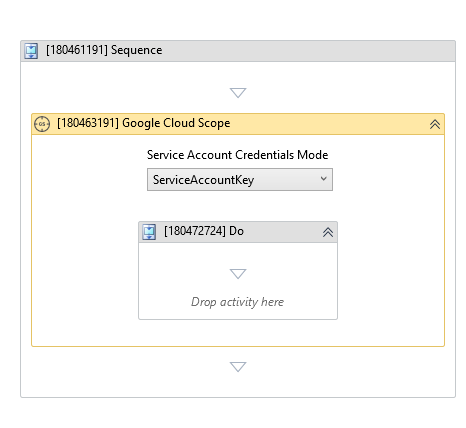
The scope displays a Service Account Credentials Mode dropdown directly in the workflow designer, letting you select the authentication method without opening the Properties panel.
- Service Account Credentials Mode - Selects the authentication mode (
AutoDetect,ServiceAccountKey, orServiceAccountKeyFromFile). - Do - The container block where you place the Google Cloud activities that will share this connection context.
Properties
Input
-
Credentials Mode: ScopeType - The method used to authenticate with Google Cloud. Select one of the following values:
Value Description AutoDetectakaBot automatically detects credentials from the environment. It checks the GOOGLE_APPLICATION_CREDENTIALSenvironment variable or the Google Cloud metadata server (if running on a Compute Engine VM). No key file or key content needs to be provided in the activity.ServiceAccountKey(default)Authenticates using the raw JSON content of a Service Account key, provided directly as a SecureStringin the Service Account Key field.ServiceAccountKeyFromFileAuthenticates using the path to a Service Account JSON key file stored on the robot machine's local disk. -
Service Account Key:
InArgument<SecureString>* - The JSON content of the Service Account key. Required when Credentials Mode is set toServiceAccountKey. -
Service Account Key From File:
InArgument<String>* - The full file path to the Service Account JSON key file on the robot machine (e.g.,"C:\akabot\credentials\gcp-key.json"). Required when Credentials Mode is set toServiceAccountKeyFromFile.
Misc
- Display Name (
String) - The display name of this activity in the workflow designer. You can rename it to make your workflow easier to read. Default:Google Cloud Scope.
See Also
- Setting Up Google Cloud Credentials - Step-by-step guide to generating and configuring Google Cloud credentials.