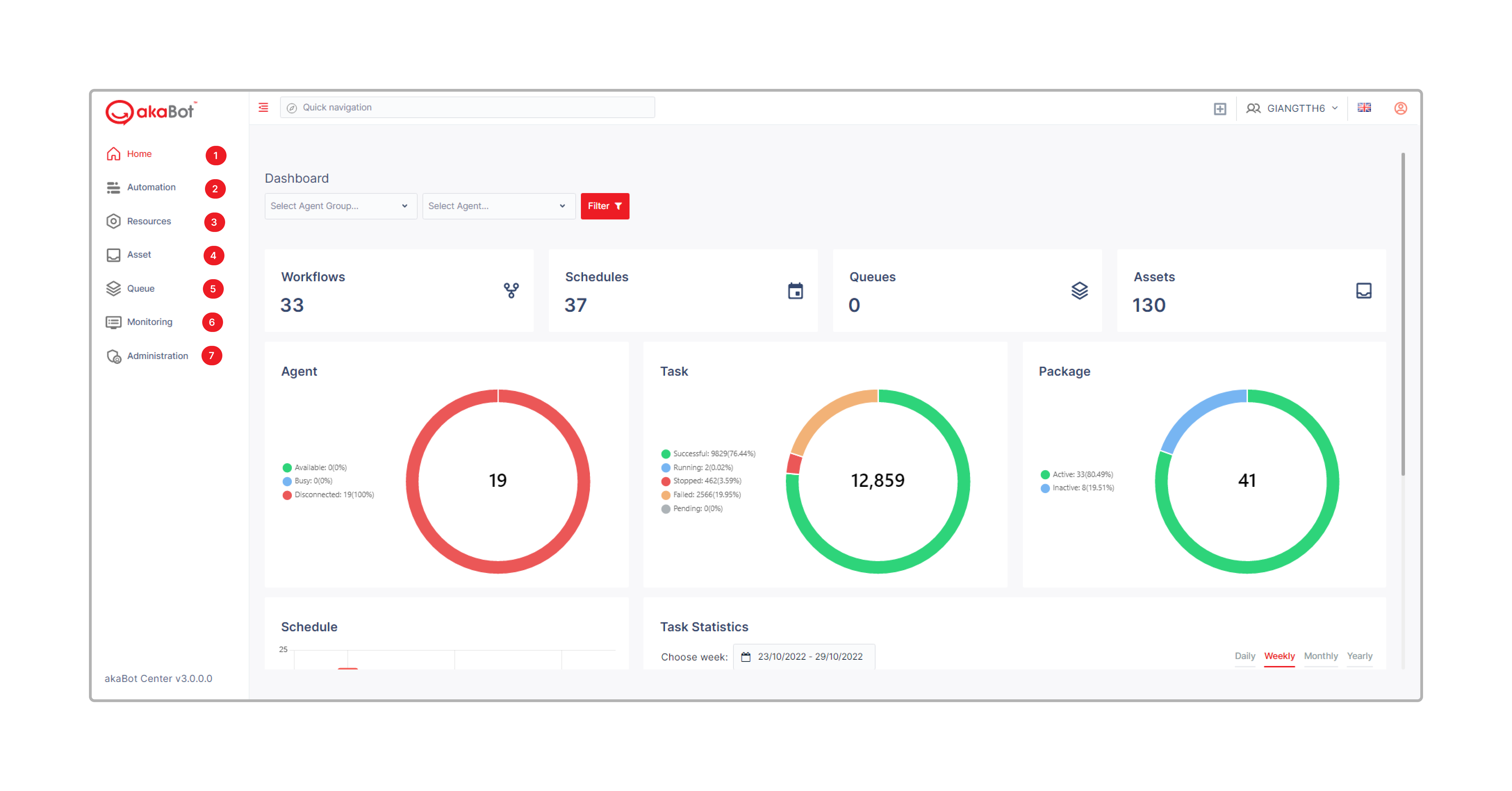
akaBot Center - Navigation
Understanding the navigation structure of akaBot Center is essential for working efficiently within the platform. The left sidebar is the primary means of moving between sections, and it is organized into logical groups that reflect the different responsibilities of RPA team members — from business users monitoring results, to operations staff managing workflows, to administrators controlling access and configuration.
The sidebar is divided into major sections: Home, Monitoring (Productivity, Report), Automation (Task, Workflow, Schedule, Package, Trigger), Resources (Agent, Agent Group, Agent Pool), Assets, Queue, and Administration (User Management, Role Management, Organization Unit, Webhook, License, Token). Each section can be expanded or collapsed independently, keeping the interface uncluttered for users who work primarily within one functional area.
Breadcrumb navigation at the top of the main content area always shows where you are within the application hierarchy, such as Automation > Workflow > Edit Workflow. Clicking any segment of the breadcrumb takes you directly to that level. Global search in the top header allows you to quickly find any resource — workflow, agent, package, or user — by keyword without having to navigate through menus.
Navigation Structure
| No | Tab | Description |
|---|---|---|
| 1 | Home | Charts and statistics for akaBot Center components |
| 2 | Automation | Include all the components related to automating activity. |
| 3 | Resources | Include the list of Agent (Software agent that automates rule-based processes in the same manner as humans do), group of Agent for deployment purposes. |
| 4 | Asset | Shared variables or configurations that can be invoked in the design processes by developers and used in your processes |
| 5 | Queue | Work queues are used to distribute work items to robot. Overview of queues and transactions statuses, and SLA predictions. |
| 6 | Monitoring | Place to control and track Agent's activities and view some reports. |
| 13 | Administration | User Management Role Management: Authorization based on access rights mapping License: Activate, renew, remove, and allocate licenses and view historical licensing data. Webhook: allow external systems to subscribe and listen to Akabot Center |