Project Settings
Available from Studio v3.2.5.0.
Overview
The Project settings dialog lets you change the Name and Description of the project that is currently open in akaBot Studio, without leaving Studio or editing the project file by hand.
The dialog only changes the project information. It does not rename the project folder or any workflow file.
Open the Project Settings Dialog
- Open a project in akaBot Studio.
- In the Project Explorer panel, click the settings (gear) button at the right end of the panel toolbar. Its tooltip is Update Project Information.
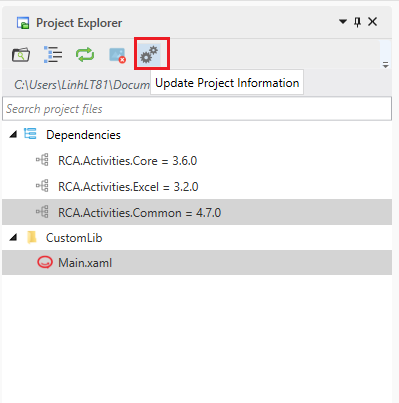
The button is available only when a project is open and no workflow is running or being debugged. Stop the current run or debugging session first if the button is disabled.
Edit the Project Information
The Project settings dialog opens with the current values already filled in.

| Field | Required | Description |
|---|---|---|
| Name | Yes | The project name. Maximum 50 characters. Spaces and characters that are not allowed in file names are rejected. |
| Description | Yes | A short description of the project. Maximum 250 characters. Press Enter to start a new line. A counter below the field shows how many characters you have used (for example, 120 / 250). |
- Change the Name and/or Description.
- Click Update to save the changes, or Cancel (or press
Esc) to close the dialog without saving.
The values are checked as you type. If a value is not valid, a red message appears under the counter and Update stays disabled until the problem is fixed:
| Message | Cause |
|---|---|
| Invalid project name. | The name is empty or contains characters that are not allowed in file names. |
| Project name contains invalid characters: ... | The name contains a space. |
| Name is too long. Use a name shorter than 50 characters. | The name is longer than 50 characters. |
| Description is required | The description is empty. |
| Description is too long. Use a description shorter than 250 characters. | The description is longer than 250 characters. |
What Is Saved
When you click Update, Studio writes the new Name and Description into the project file (project.json) in the project folder. After a successful update, the dialog closes and the Studio window title shows the new project name.
Troubleshooting
| Message | What to do |
|---|---|
| Project information cannot be updated right now. Stop execution and try again. | A workflow is running or being debugged (or the project was switched). Stop execution, then click Update again. The dialog stays open, so your changes are not lost. |
| Could not save the project information. Please try again. | Studio could not write the project file (for example, the file is read-only or locked by another program). The message is followed by the detailed error. Fix the cause and click Update again. |
Project Name Rules for New Projects
When you create a new project, the project name must also be a valid package name. Besides the rules above, Studio rejects names that:
- contain spaces (including full-width spaces) or symbols other than letters, numbers,
.,_and-; - start or end with
.or-; - contain consecutive delimiters such as
..or.-.
In that case Studio shows the message Project name contains invalid characters: ..., followed by the characters that are not allowed and this explanation: The project name can only contain letters (in any language), numbers, and delimiters ('.', '_', '-'). Spaces and special symbols are not allowed.