Read Range
RCA.Activities.Excel.ReadRange
Description
This activity allows you to read data from an Excel range and store it in a DataTable variable.
If the range is not specified, the entire worksheet starting from the first cell is read.
This activity uses the ClosedXML library.
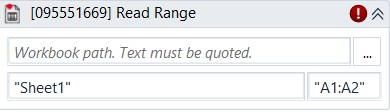
* indicates required fields.
In the Body of Activity
- Workbook Path (String)*: The path of the Excel file to read.
Example:"C:\FolderName\SaleReport.xlsx" - Sheet Name (String)*: The sheet to read.
Example:"Sheet1" - Range: The range of data to read. If not specified, the entire worksheet is read.
Example:"A1:B2"
Properties
Input
- Workbook Path (String): The path of the Excel file to read.
Example:"C:\FolderName\SaleReport.xlsx" - Sheet Name (String): The sheet to read.
Example:"Sheet1" - Range: The range of data to read. If not specified, the entire worksheet is read.
Example:"A1:B2"
Options
- Add Headers (Checkbox): If selected, column headers from the specified range are included. By default, this option is selected (
True). - Preserve Format (Checkbox): Keeps the original formatting of the range. By default, this option is not selected.
Misc
- Public (Checkbox): If selected, the activity data will be logged. Consider data security before using this property.
- Display Name (String): The name of this activity. You can edit it to better organize and structure your workflow.
Example:Read Range
Output
- DataTable (DataTable): Stores the extracted data from the specified Excel range in a DataTable variable.