Find First/Last Data Row
RCA.Activities.Excel.Modern.FindFirstLastDataRowX
Description
This activity returns the row numbers where the data in one column starts and ends, without reading the whole range into a DataTable. The results are worksheet row numbers (Int32).
The search starts below the header row (when First row contains headers is selected) and stops after Stop after empty rows consecutive empty rows. Empty rows before the data starts do not count. If the column holds no data, both outputs are 0.
This activity must be placed inside a Use Excel File scope.
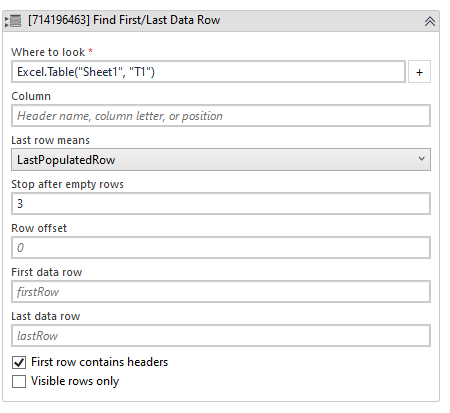
(* is mandatory)
In the body of the activity
- Where to look (ExcelRangeRef)* - The sheet, range or table to scan. Use the + button to build the reference.
E.g:Excel.Sheet("Sheet1") - Column (String) - See Input.
- Last row means (DropDownList) - See Options.
- Stop after empty rows (Int32) - See Options.
- Row offset (Int32) - See Options.
- First data row (Int32) - See Output.
E.g: firstRow - Last data row (Int32) - See Output.
E.g: lastRow - First row contains headers (Checkbox) - See Options.
- Visible rows only (Checkbox) - See Options.
Properties
Input
- Where to look (ExcelRangeRef)* - The sheet, range or table to scan.
E.g:Excel.Table("Sheet1", "Table1") - Column (String) - The column to scan: a header name, a column letter, or a column number counted from column A of the sheet. For a table, use the table column name. Leave empty to use the first column.
E.g: "Name", "B" or "2"
Options
- First row contains headers (Checkbox) - When selected, the first row is a header and is not counted as data. By default, this check box is selected.
- Visible rows only (Checkbox) - When selected, hidden or filtered-out rows are treated as empty. By default, this check box is not selected.
- Stop after empty rows (Int32) - How many consecutive empty rows end the search, so a few gaps in the data are not mistaken for its end. Values below 1 are treated as 1. By default, this is 3.
- Row offset (Int32) - A number added to both results, e.g. 1 to point just past each one. By default, this is 0 (empty).
- Last row means (DropDownList) - Which row is returned as the last one. By default, LastPopulatedRow is selected. The drop-down contains two options, as follows:
・LastPopulatedRow - The last row that has data in it.
・FirstEmptyRow - The first empty row after the data, which is where an append would land.
Output
- First data row (Int32) - The row number of the first row with data, plus Row offset.
- Last data row (Int32) - The row number chosen by Last row means, plus Row offset.
Misc
- Public (Checkbox) - Check if you want to publicize it. Remember to consider data security requirements before using it.
- Display Name (String) - The name of this activity. You can edit the name of the activity to organize and structure your code better.
E.g: Find First/Last Data Row