Activation
Step 1:
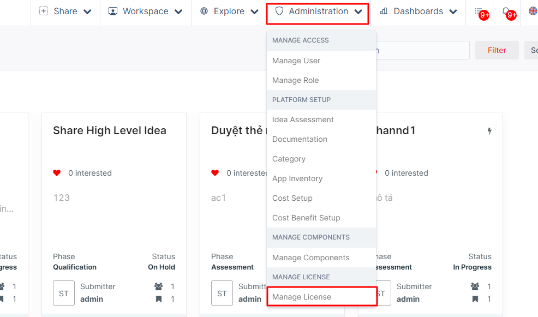
Open your browser. Navigate to akaBot Automation Hub using your Hub URL or localhost:8080. After successful login, choose the Administration option, then click Manage License.
Step 2:
Click Add License

Step 3:
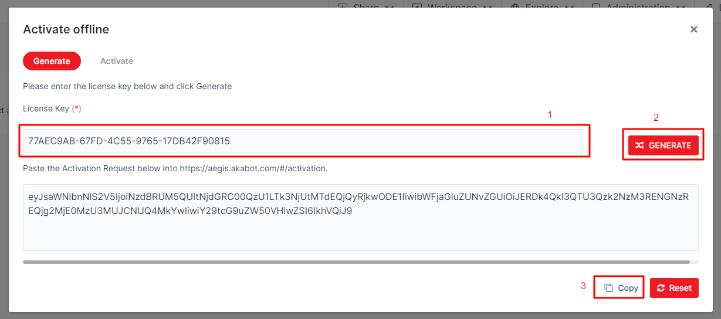
- Fill in the License Key field with the License Key you received from the licensing email.
- Click Generate.
- Click the Copy button to copy the Activation Request code.
Step 4:
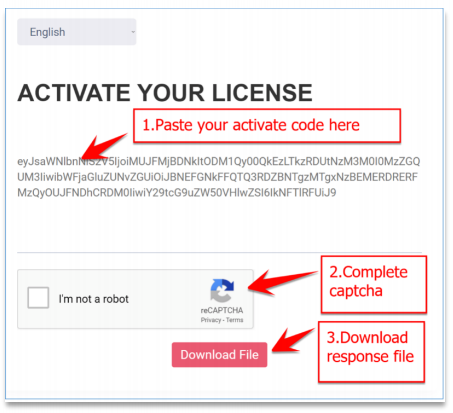
- On the computer with Internet access, navigate to https://aegis.akabot.com/#/activation.
- Paste the Activation Request code in the Activation Request field and click the Download File button. The Activation Response code is generated and downloaded as a text file named “Active.txt".
Step 5:
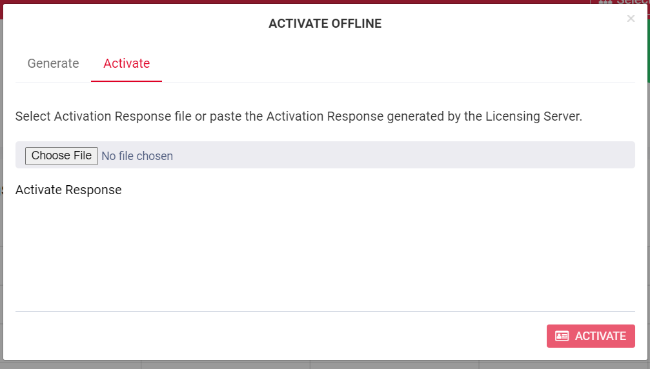
- Return to akaBot Automation Hub. Choose the Activate tab.
- Choose and upload “Active.txt”.
- Click on Activate button.