Stop Task
RCA.Activities.Core.StopTask
Description
With this activity, you can stops or updates the state of a task on the Center. You must have role for robot to edit task resource on the Center to perform this action. Use 'stop' to terminate the task on the Center. Use 'Update State' when a task to encounters an error or unexpected issue, allowing you to update its status accordingly.
The activity features two distinct configuration layouts depending on your strategy: the standard Stop layout and the Update State layout.

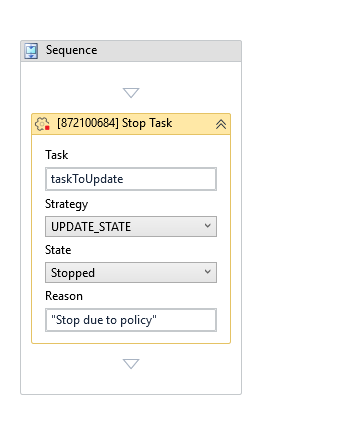
(* for Mandatory)
In the body of activity
- Task – Enter the task to be stopped. Supports task variables and VB expressions.
- Strategy – Select the strategy used to stop the task.
- State - Specifies the state of the task you when to update
- Reason - Specifies the reason of the task you when to update
Properties
-
Continue On Error (Boolean): Specifies to continue executing the remaining activities even if the current activity failed. Only boolean values (True, False) are supported
-
Timeout MS (Int32): Specifies the amount of time (in milliseconds) to wait for the activity to run before an error is thrown. The default value is 30000 milliseconds.
Input
- Reason - Specify the reason for update state this task.
- Task - Specifies the task that will be stopped
Misc
- Public (Checkbox)- If you check it, the data of this activity will be shown in the log. Be careful, consider data security before using it.
- Display Name (String) - The name of this activity. You can edit the name of the activity to organize and structure your code better.