Start Task
RCA.Activities.Core.StartTask
Description
With this activity, you can initiates a new task via Center to be picked up by any available robots. It immediately continues the execution without waiting for the task to finish. It does not return output arguments.
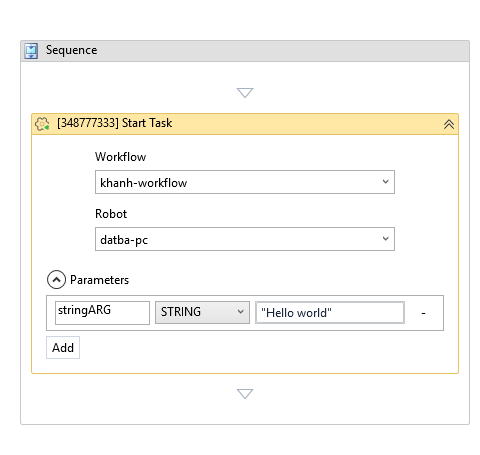
(* for Mandatory)
In the body of activity
- Workflow – Select the workflow to be executed as a task.
- Robot – Select the robot that will execute the task.
- Parameters – Click here to configure the input parameters passed to the selected workflow.
Properties
-
Continue On Error (Boolean): Specifies to continue executing the remaining activities even if the current activity failed. Only boolean values (True,False) are supported.
-
Timeout MS (Int32): The maximum time (in milliseconds) to wait for the activity to complete before throwing an error. If the timeout is reached, the activity stops execution. The default value is 30000 (milliseconds).
Misc
- Public (Checkbox)- If you check it, the data of this activity will be shown in the log. Be careful, consider data security before using it.
- Display Name (String) - The name of this activity. You can edit the name of the activity to organize and structure your code better.
Output
-
Task Id
OutArgument<Int32>: Outputs the ID of the task that was started. -
Workflow Id:
OutArgument<Int32>: The unique identifier for the started workflow.