Write Line
System.Activities.Statements.WriteLine
Description
Enables you to print string values to the Output panel2
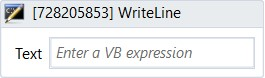
(* for Mandatory)
In the body of activity
- Text (String)* - The message you want to show in the Output panel. Accept both Text and String variables.
E.g: “Display this variable” + intName.toString.
Properties
Misc
- Public (Checkbox) - If you check it, the data of this activity will be shown in the log. Be careful, consider data security before using it.
- Display Name (String) - The name of this activity. You can edit the name of the activity to organize and structure your code better.
E.g: Write Line - Text (String)* - The message you want to show in the Output panel.
- Text Writer (TextWriter) - This box is optional. Sends the content in the Text property to a different target from the default Output pane.