The User Interface
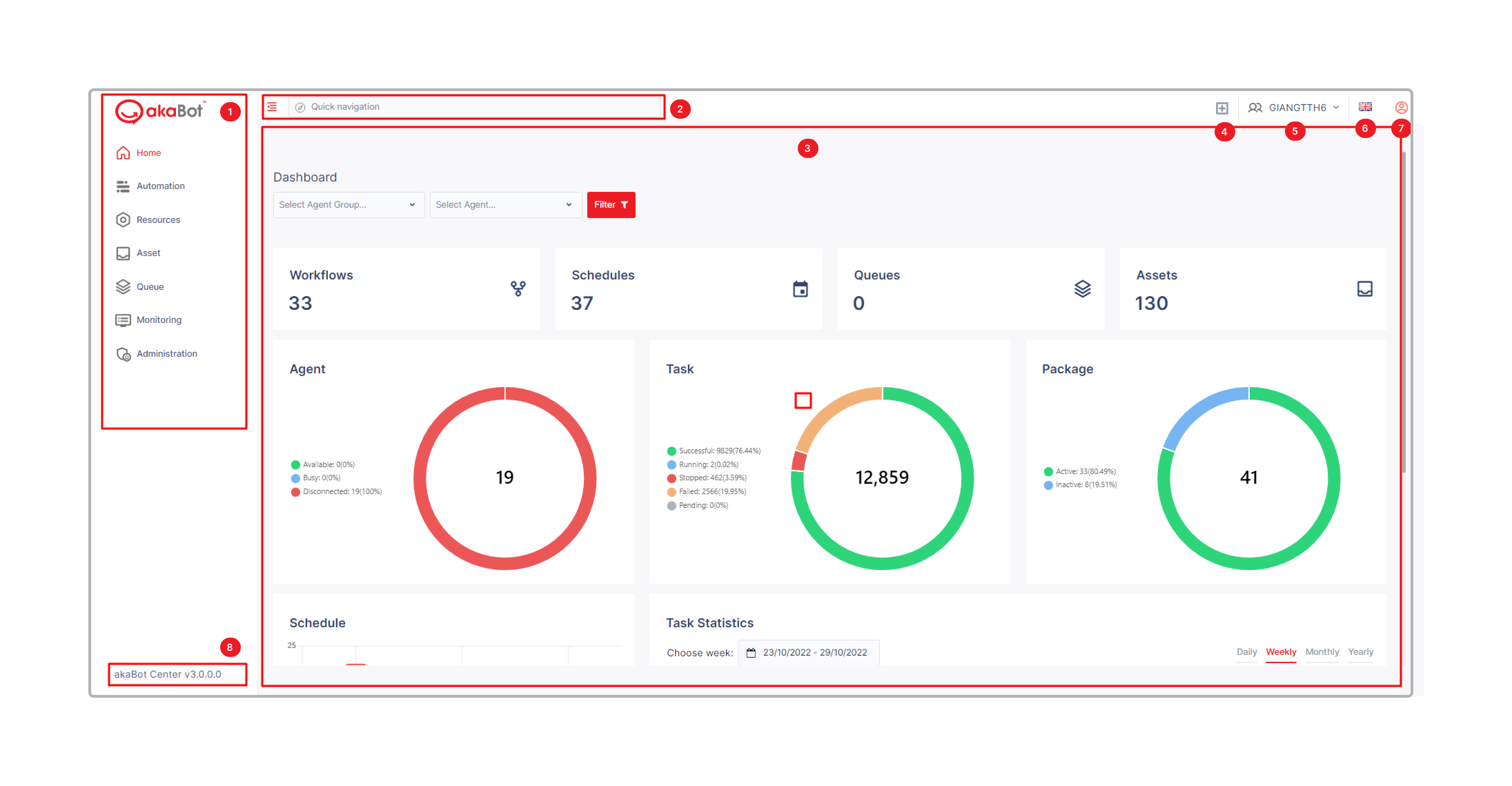
The akaBot Center user interface is a web-based application designed for clarity and operational efficiency. The layout is organized around a persistent left-hand navigation sidebar, a top header bar, and a main content area that changes based on the selected module. This consistent structure allows users to quickly switch between different operational functions — such as monitoring running jobs, reviewing reports, or managing agents — without losing context.
The top header bar displays the current user's name and profile options, system notifications, and quick-access settings. The notification bell icon provides real-time alerts for critical events such as job failures, agent disconnections, or license expiry warnings. Clicking on a notification takes the user directly to the relevant detail page, reducing the time needed to diagnose and respond to operational issues.
The main content area adapts its layout depending on the active module. List views use sortable, filterable tables to display records such as jobs, agents, or packages. Detail views show configuration forms, execution logs, and status indicators. Dashboard views like the Home screen use widget-based layouts with charts and counters to provide at-a-glance operational summaries.
UI Layout Overview
| No | Panel | Description |
|---|---|---|
| 1 | Feature menu | Show all the main functionality of akaBot Center |
| 2 | Quick Navigation | Easily navigate to page, package, agent, agent group, workflow, asset, queue, schedule,… |
| 3 | Main screen | Display the details of each functionality |
| 4 | Quick create | Quickly create a Task/ Schedule/Workflow/Trigger/Agent |
| 5 | Organization Unit Selection Menu | Change the active Organization Unit |
| 6 | Language | Change the display language of Akabot Center. Support English, Korean, Japanese, Vietnamese and Taiwanese. |
| 7 | User Menu | Access the following options and pages: Settings: On this page, you can change the user details such as First Name, Last Name, Email and the display language. Password: On this page, you can change the password that used to log in to Center. * Sign out: Click here to sign out. |
| 8 | Version | Show the version of akaBot Center |