Path Exists
RCA.Activities.Core.PathExists
Description
This activity allows you to open a dialog and check if the specified path of file or folder/directory exists.
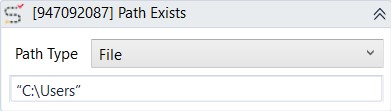
(* for Mandatory)
In the body of activity
- Path type (Dropdown list)- Choose type of path. File or Folder.
- Text (String)* - The full path of the file or folder that needs to be checked.
E.g: “C:\Users”
Properties
Input
- Path (String)* -The full path of the file or folder that need to be checked.
E.g: “C:\Users” - Path Type (Dropdown list)- Choose type of path. File or Folder.
Misc
- Public (Checkbox)-If you check it, the data of this activity will be shown in the log. Be careful, consider data security before using it.
- Display Name (String)- The name of this activity. You can edit the name of the activity to organize and structure your code better.
E.g: [791440496] Path Exists
Output
- Path Exists (Boolean)-The result of the check. Only return True or False.