Log Message
RCA.Activities.Core.LogMessage
Description
This activity allows you to write the specified diagnostic message at the specified level. These messages are also sent to Center and displayed on the Logs page.
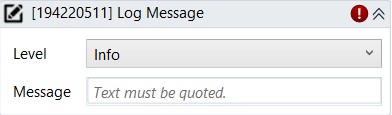
(* for Mandatory)
In the body of activity
- Level (Dropdown list) - The importance level of the message to be logged. The following options are available: Trace, Info, Warn, Error and Fatal
- Message (String)- The message you want to display in the log message window.
E.g: “Warning! This is an error message”
Properties
Input
- Level (Drop down list)* - The importance level of the message to be logged. The following options are available: Trace, Info, Warn, Error and Fatal
- Message (String)*- The message you want to display in the log message window.
E.g: “Warning! This is an error message”
Misc
- Public (Checkbox) - If you check it, the data of this activity will be shown in the log. Be careful, consider data security before using it.
- Display Name (String)- The name of this activity. You can edit the name of the activity to organize and structure your code better.
E.g: [477455298] Log Message