Upgrade ActiveMQ Version in akaBot Center
1. Download ActiveMQ
-
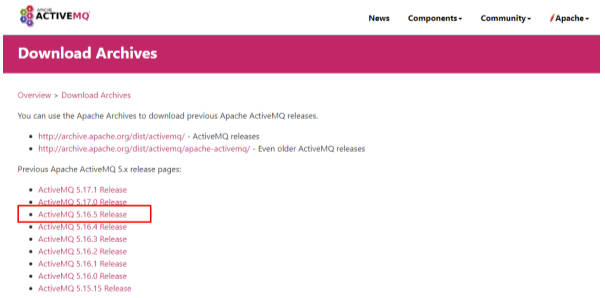
Go to link: https://activemq.apache.org/download-archives
-
Click version want to download (ActiveMQ 5.16.5 Release)
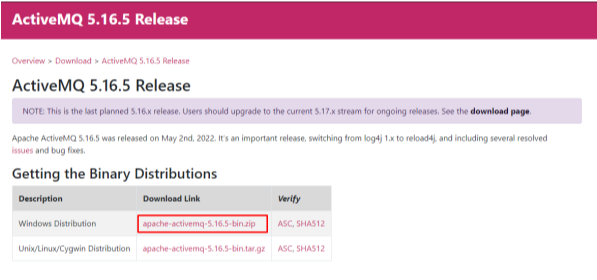
- Download jar file (apache-activemq-5.16.5-bin.zip)
2. Upgrade ActiveMQ
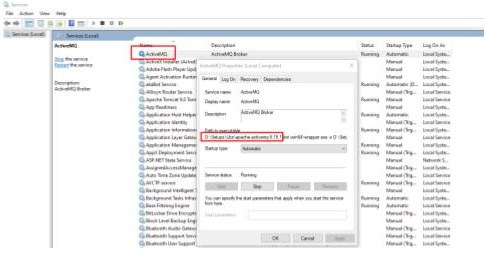
- Go to Services’ windows to get path installed ActiveMQ
- Go to Run and type services.msc
- Find service name ActiveMQ and get path installed ActiveMQ (eg ACTIVEMQ_PATH_OLD: D:\Setups\Libs\apache-activemq-5.15.1"
- Uninstall old services ActiveMQ
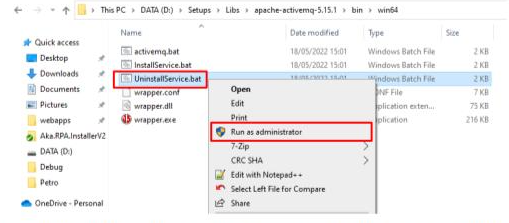
- Go to ACTIVEMQ_PATH_OLD/bin/win64
- Exec UninstallService.bat file by right click and Run as administrator
- Extract zip new version ActiveMQ (eg. apache-activemq-5.16.5-bin.zip) to path you want to install (eg. ACTIVEMQ_PATH_OLD: D:\Setups\Libs)

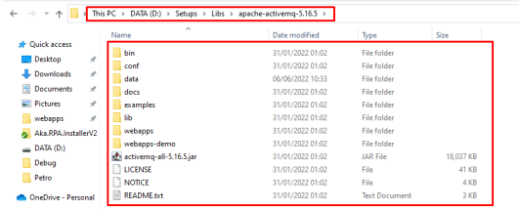
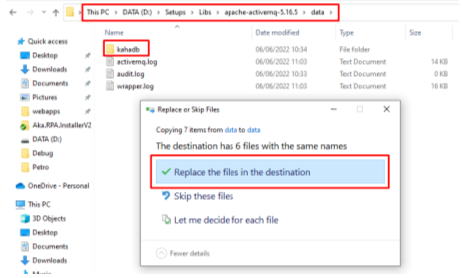
- Copy and replace (override) folder kahadb from old version to new version of ActiveMQ
ACTIVEMQ_PATH_OLD/data/kahadb to ACTIVEMQ_PATH_NEW/data/kahadb
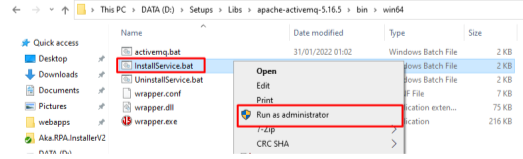
- Intall new services ActiveMQ
- Go to ACTIVEMQ_PATH_NEW/bin/win64
- Exec InstallService.bat file by right click and Run as administrator
- Go to Services’ window to verify ActiveMQ’s version and start service ActiveMQ
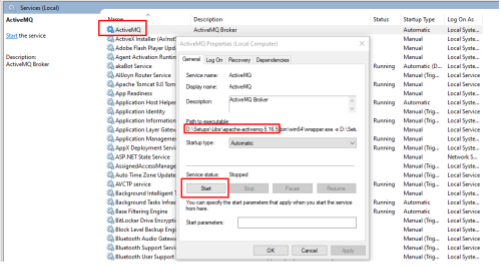
- Ensure ActiveMQ’s service is Running

- Go to http://localhost:8161/ (account/pass: admin/admin) to verify ActiveMQ