Create Bucket
RCA.Activities.GoogleCloud.GCPCreateBucket
Description
Creates a Google Cloud Storage bucket.
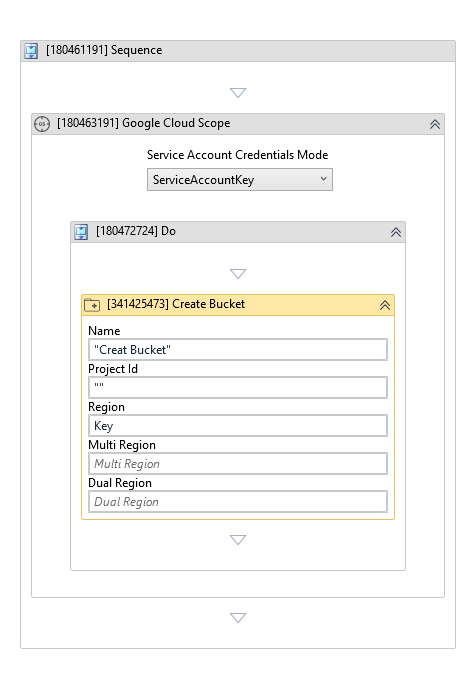
(*For mandatory)
In the body of the activity
- Name - The bucket name.
- Project Id - The Google Cloud project ID.
- Region - The region location for the bucket.
- Multi Region - The multi-region location for the bucket.
- Dual Region - The dual-region location for the bucket.
Properties
-
Encryption Type (Dropdown List) - The bucket encryption type. Select one of the following options:
- GoogleManaged - Uses Google-managed encryption keys.
- CustomerManagedKey - Uses customer-managed encryption keys.
-
Customer Managed Key:
InArgument<String>- The customer-managed encryption key. Required when Encryption Type is CustomerManagedKey.
Input
-
Name:
InArgument<String>* - The bucket name. -
Project Id:
InArgument<String>* - The Google Cloud project ID.
Options
-
Access Control Typee (Dropdown List) - The bucket access control type. Select one of the following options:
- Uniform - Uniform bucket-level access applies the same permissions to all objects in the bucket.
- FineGrained - Fine-grained access control allows you to manage permissions for individual objects using Access Control Lists (ACLs).
-
Labels:
InArgument<DataTable>- Labels to assign to the bucket. -
Storage Class: Storage - The bucket storage class.
Misc
-
Public (Checkbox) - Check if you want to public the activity. Remember to consider data security requirement before using this property.
-
Display Name (String) - The name of this activity. You can edit the name of the activity to organize and structure your code better. E.g: [3424325] Open Window
Output
- Bucket:
OutArgument<GCPBucket>- The created bucket.
Region
-
Region:
InArgument<String>- The region location for the bucket. Use exactly one of Region, Multi Region, or Dual Region. -
Multi Region:
InArgument<String>- The multi-region location for the bucket. -
Dual Region:
InArgument<String>- The dual-region location for the bucket.