Upload File
RCA.Activities.Office365.UploadFile
Description
Uploads a local file to OneDrive or SharePoint.
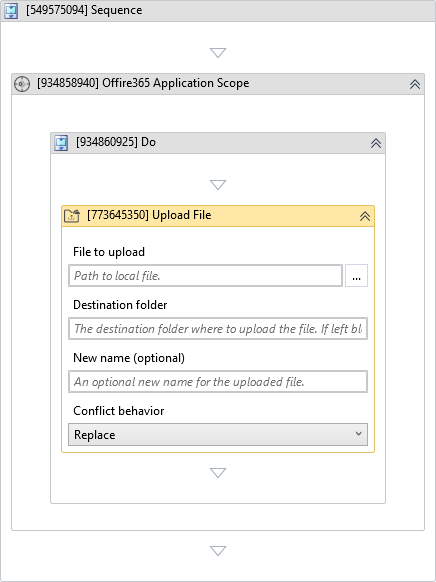
(*For mandatory)
In the body of the activity
- File to upload - The path to a local file to upload.
- Destination folder - The destination folder where to upload the file.
Properties
Input
-
File to upload:
InArgument<String>* - The path to a local file to upload. -
Destination folder:
InArgument<DriveItem>- The destination folder where to upload the file. If left blank, it will default to OneDrive root folder. -
New name (optional):
InArgument<String>- An optional new name for the uploaded file. -
Conflict behavior:
ConflictBehavior- Indicates the conflict resolution behavior in case a file with the same name already exists. -
Metadata:
InArgument<DataTable>- The metadata to associate with the resulted DriveItem. It works only for a DriveItem stored in a SharePoint Document Library. It should contain two columns: field display name (String) and value (Object).
Options
- Account:
InArgument<String>- The ID or User Principal Name for the user who owns the OneDrive. This parameter must be set for ApplicationIdAndSecret and ApplicationIdAndCertificate authentication types.
Output
- Reference as:
OutArgument<DriveItem>- The name you will use to refer the uploaded file in other activities.
Misc
-
Public (Checkbox) - Check if you want to public the activity. Remember to consider data security requirement before using this property.
-
Display Name (String) - The name of this activity. You can edit the name of the activity to organize and structure your code better. E.g: [3424325] Open Window
- Reference as (Output): Press Ctrl + K to create a
DriveItemvariablemyUploadedFile.
- Reference as (Output): Press Ctrl + K to create a
- Add a Log Message activity to print the web URL of the uploaded file:
- Set Message to the VB.NET expression:
"File uploaded successfully. Web URL: " & myUploadedFile.WebUrl
- Set Message to the VB.NET expression:
- Run the workflow. The file is uploaded, any conflict is resolved by replacing the old file, and the web URL is logged.