Select Menu Item
RCA.Activities.Common.SelectMenuItem
Description
Select a Menu Item from the main SAP GUI window. After indicating the window, the list with all available Menu Items is displayed in the activity.
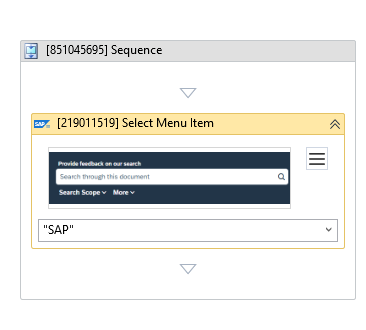
(* For mandatory)
In the body of activity
- Indicate on screen - Enables to select a UI element or region on screen while running the workflow.
Properties
Common
- Continue On Error (Boolean) - Specifies if the workflow should continue running even when this activity encounters an error. Only Boolean values (
True,False) or variables are supported.- True - Allows the workflow to ignore the error and continue executing subsequent activities.
- False (Default) - Stops the workflow execution and throws an error if this activity fails.
- Delay After (Int32) - The delay time (in milliseconds) to wait after executing this activity. Default is
300milliseconds. - Delay Before (Int32) - The delay time (in milliseconds) to wait before this activity starts performing any actions. Default is
200milliseconds.
Input
- Menu (String)* - The path or name of the menu item in the SAP GUI window to select (e.g.,
"System > User Profile > Own Data"). After indicating the SAP window, you can select the menu item from the dropdown menu in the activity.
Target
- CvElement (CvElement) - The Computer Vision element to target. Supports variables of type CvElement.
- CvType (CvType) - The type of Computer Vision element.
- Element (UiElement) - An existing UI element variable to use as the target, instead of using a selector.
- FuzzySelector (String) - An alternate selector that uses fuzzy matching logic to locate the target element.
- SearchSteps (SearchSteps) - Specifies the strategy for finding the target element.
- Selector (String)* - The XML selector fragment used to locate the target SAP window. If you select the window on the screen, this is generated automatically.
- Timeout MS (Int32) - The maximum time (in milliseconds) to wait for the target element to appear before throwing an error. Default is
30000(30 seconds). - Wait For Ready (WaitType) - Specifies whether the activity should wait for the target element to become interactive before performing the action. Options include
None,Interactive, orComplete.
Misc
- Display Name (String) - The name displayed for this activity in the designer panel. You can edit this name to organize and structure your workflow better.
E.g: [219011519] Select Menu Item - Public (Checkbox) - If selected, logs the execution details and variables of this activity. Consider data security requirements before enabling this option, as sensitive details could be written to the logs.
Options
- Alter If Disabled (Boolean) - If selected, forces the select action even if the target Menu Item is disabled.