Browser Group Policies
Organizations that manage Google Chrome, Microsoft Edge or Mozilla Firefox with Group Policy (GPO), Intune or another MDM tool can block the akaBot Web Extension without anyone noticing. This page lists the policies that affect the extension, the values akaBot needs, and how to deploy the extension by policy for many machines.
To see the policies that are active on a machine, open:
- Chrome:
chrome://policy - Edge:
edge://policy - Firefox:
about:policies
The example below shows chrome://policy after installing the extension in Policy mode (section 3):
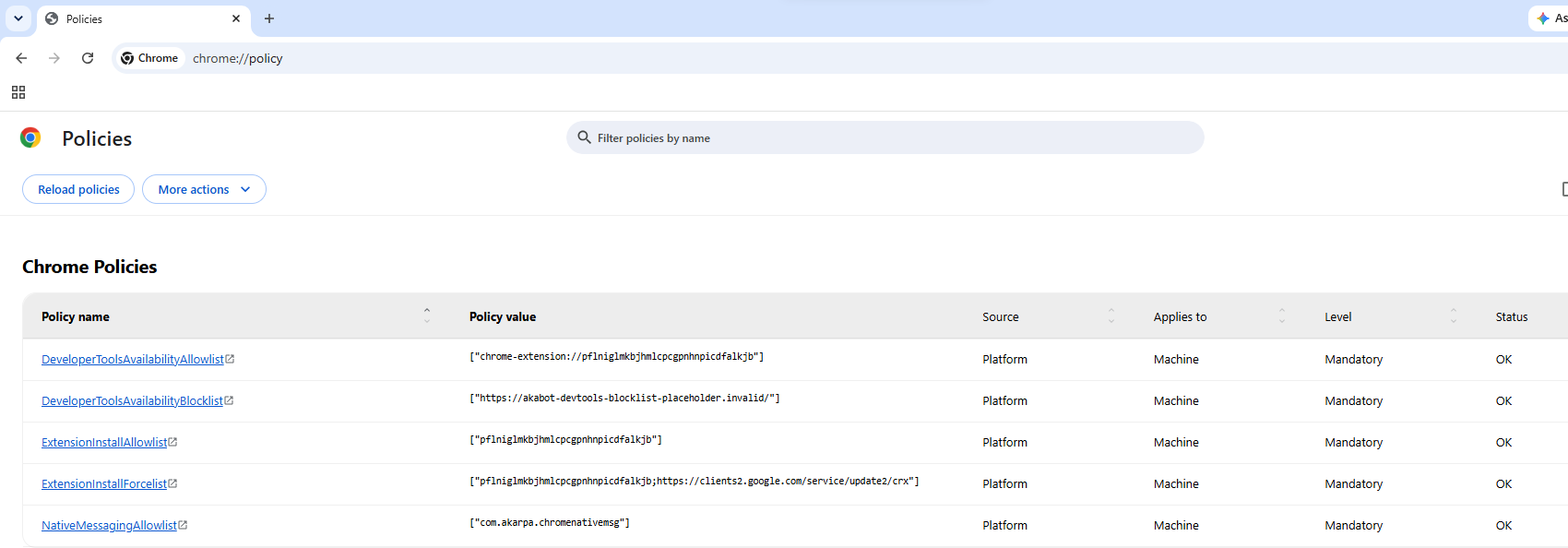
All policies on this page are machine policies stored under HKEY_LOCAL_MACHINE. Changing them requires administrator rights, and the browser applies them only after every browser process has exited (see Background processes).
1. akaBot extension identifiers
Use these values when you configure the policies below.
| Browser | Extension ID | Native messaging host | Policy registry key |
|---|---|---|---|
| Google Chrome | pflniglmkbjhmlcpcgpnhnpicdfalkjb | com.akarpa.chromenativemsg | HKLM\SOFTWARE\Policies\Google\Chrome |
| Microsoft Edge | idcmnficjddehpcjmkfcmomijikkgdgh | com.akarpa.edgenativemsg | HKLM\SOFTWARE\Policies\Microsoft\Edge |
| Mozilla Firefox | support@akabot.com | com.akarpa.firefoxnativemsg | HKLM\SOFTWARE\Policies\Mozilla\Firefox |
The extension talks to akaBot Studio and akaBot Agent through the native messaging host (Aka.RPA.NativeMessagingHost). If the browser blocks the native host, the extension is installed but Indicate, recording and the browser activities cannot reach the browser.
2. Installation modes
akaBot Studio installs the extension in one of three modes (Options > Extensions). The mode decides which policies akaBot writes.
| Mode | Browsers | Who it applies to | Where the extension comes from | Administrator rights |
|---|---|---|---|---|
| User | Chrome, Edge, Firefox | Current Windows user | The package shipped with akaBot Studio | No |
| Policy | Chrome, Edge, Firefox | Every user of the machine | Chrome Web Store / Edge Add-ons (Chrome, Edge); the .xpi shipped with akaBot Studio (Firefox) | Yes |
| Policy (Offline) | Chrome, Edge | Every user of the machine | The .crx shipped with akaBot Studio, copied to C:\ProgramData\akaBot\Extensions — no store access needed | Yes |
Use Policy or Policy (Offline) when your organization's policies block User-mode installs (see section 4). Use Policy (Offline) when the robot machines cannot reach the Chrome Web Store or Edge Add-ons.
Note: Chrome and Edge on Windows only load a force-installed extension from outside their store on a managed machine: joined to an Active Directory domain or enrolled in device management (MDM, for example Intune). Chrome also accepts machines enrolled in Chrome Browser Cloud Management. On other machines akaBot refuses to install in Policy (Offline) mode — use Policy instead.
For step-by-step instructions, see How to install akaBot Web Extension.
3. Policies akaBot writes (Chrome and Edge)
When you install in Policy or Policy (Offline) mode, akaBot writes the following values under the browser's policy key (section 1). Each list is a key whose values are named 1, 2, 3… akaBot reuses its own entry and never removes entries of other products. If your organization deploys these policies by GPO instead, the GPO must contain the same values, otherwise the GPO overwrites them at the next refresh.
| Policy (registry key) | Value for Chrome | Purpose |
|---|---|---|
ExtensionInstallForcelist | Policy: pflniglmkbjhmlcpcgpnhnpicdfalkjb;https://clients2.google.com/service/update2/crxPolicy (Offline): pflniglmkbjhmlcpcgpnhnpicdfalkjb;file:///C:/ProgramData/akaBot/Extensions/chrome/update.xml | Force-installs the extension for every user. It cannot be turned off or removed by the user. |
ExtensionInstallAllowlist | pflniglmkbjhmlcpcgpnhnpicdfalkjb | Exempts the extension from ExtensionInstallBlocklist. |
NativeMessagingAllowlist | com.akarpa.chromenativemsg | Exempts the akaBot native host from NativeMessagingBlocklist. |
DeveloperToolsAvailabilityAllowlist | chrome-extension://pflniglmkbjhmlcpcgpnhnpicdfalkjb | Allows the developer tools API for the akaBot extension only. |
DeveloperToolsAvailabilityBlocklist | https://akabot-devtools-blocklist-placeholder.invalid/ | Placeholder entry. Chrome and Edge apply the allowlist only when the blocklist is also set. |
For Edge, use the Edge extension ID idcmnficjddehpcjmkfcmomijikkgdgh, the native host com.akarpa.edgenativemsg, and:
- Policy:
idcmnficjddehpcjmkfcmomijikkgdgh;https://edge.microsoft.com/extensionwebstorebase/v1/crx - Policy (Offline):
idcmnficjddehpcjmkfcmomijikkgdgh;file:///C:/ProgramData/akaBot/Extensions/msedge/update.xml
akaBot also registers the native host for the whole machine (not a policy):
| Registry key | Default value |
|---|---|
HKLM\SOFTWARE\Google\Chrome\NativeMessagingHosts\com.akarpa.chromenativemsg | C:\Program Files\FPT Software\akaBot Platform\akaBot\NativeHost\com.akarpa.chromenativemsg.json |
HKLM\SOFTWARE\Microsoft\Edge\NativeMessagingHosts\com.akarpa.edgenativemsg | C:\Program Files\FPT Software\akaBot Platform\akaBot\NativeHost\com.akarpa.edgenativemsg.json |
The paths above are for the default installation folder. The key is written in both the 64-bit and 32-bit registry views.
3.1 Policy (Offline) files
In Policy (Offline) mode akaBot copies the extension package to the machine and writes an update manifest that ExtensionInstallForcelist points to:
C:\ProgramData\akaBot\Extensions\
    chrome\
        akabot-<version>.crx
        update.xml
    msedge\
        akabot-<version>.crx
        update.xml
update.xml has this content (Chrome example):
<?xml version="1.0" encoding="UTF-8"?>
<gupdate xmlns="http://www.google.com/update2/response" protocol="2.0">
  <app appid="pflniglmkbjhmlcpcgpnhnpicdfalkjb">
    <updatecheck codebase="file:///C:/ProgramData/akaBot/Extensions/chrome/akabot-3.0.3.crx" version="3.0.3" />
  </app>
</gupdate>
- The
Extensionsfolders can only be changed by Administrators and SYSTEM; users can only read them. If one of these folders already exists and was not created by an administrator, akaBot refuses to use it. Delete the folder and install again. - The package must be the akaBot extension (same extension ID). akaBot checks this before writing the policy.
- Do not delete these files. If the package is missing, the browser removes the extension at its next start.
4. Policies that can block the extension (Chrome and Edge)
If one of the following policies is set on the machine, the extension may not install or may not work. Most of them are solved by installing in Policy or Policy (Offline) mode, which writes the allowlist entries for you. If your organization sets the policies by GPO, ask your IT administrator to add the values to the GPO.
4.1 ExtensionInstallForcelist
Lists the extensions the browser installs for every user. akaBot adds its own entry in Policy modes (section 3). If a GPO manages this list and does not contain the akaBot entry, the GPO removes it at the next Group Policy refresh. Add the akaBot entry to the GPO:
- Machines that can reach the store:
pflniglmkbjhmlcpcgpnhnpicdfalkjb;https://clients2.google.com/service/update2/crx - Managed machines without store access:
pflniglmkbjhmlcpcgpnhnpicdfalkjb;file:///C:/ProgramData/akaBot/Extensions/chrome/update.xml(install once in Policy (Offline) mode on each machine so the files in section 3.1 exist).
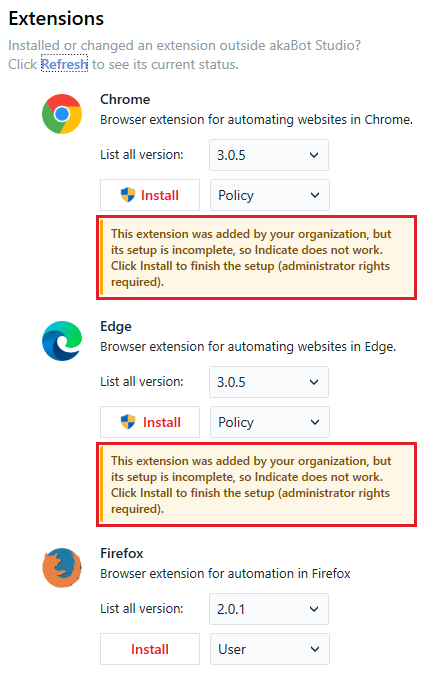
Note: If the extension is force-installed by a GPO but the other values of section 3 are missing, akaBot Studio shows "This extension was added by your organization, but its setup is incomplete, so Indicate does not work" under the browser in Options > Extensions. Click Install to finish the setup.
4.2 NativeMessagingBlocklist
Blocks native messaging hosts. A value of * blocks every host that is not in NativeMessagingAllowlist, including the akaBot native host.
Fix: add the akaBot native host to NativeMessagingAllowlist (section 4.3).
4.3 NativeMessagingAllowlist
Exempts native messaging hosts from NativeMessagingBlocklist.
Fix: add com.akarpa.chromenativemsg (Chrome) or com.akarpa.edgenativemsg (Edge).
4.4 NativeMessagingUserLevelHosts
If set to 0 (false), the browser ignores native hosts registered for the current user only (HKCU). An extension installed in User mode then cannot reach akaBot.
Fix: install in Policy or Policy (Offline) mode, which registers the native host for the machine (HKLM), or set this policy to 1.
4.5 ExtensionInstallBlocklist
Blocks the installation of extensions. A value of * blocks every extension that is not in ExtensionInstallAllowlist.
Fix: install in Policy or Policy (Offline) mode, or add pflniglmkbjhmlcpcgpnhnpicdfalkjb (Chrome) / idcmnficjddehpcjmkfcmomijikkgdgh (Edge) to ExtensionInstallAllowlist.
4.6 BlockExternalExtensions
If set to 1 (true), the extension can only be installed by policy; User mode does not work.
Fix: install in Policy or Policy (Offline) mode, or set this policy to 0.
4.7 ExtensionAllowedTypes
If set, only the listed types of extensions can be installed.
Fix: add extension to the list.
4.8 ExtensionSettings
Can block every extension ("*": { "installation_mode": "blocked" }) or set rules for the akaBot extension ID.
Fix: install in Policy or Policy (Offline) mode, or add the akaBot extension ID to ExtensionInstallAllowlist. If ExtensionSettings has an entry for the akaBot extension ID, its installation_mode must not be blocked or removed.
4.9 DeveloperToolsAvailability, DeveloperToolsAvailabilityAllowlist and DeveloperToolsAvailabilityBlocklist
The akaBot extension uses the browser's developer tools API (chrome.debugger). If DeveloperToolsAvailability is 2 (developer tools blocked), the extension cannot run.
Fix (recommended): keep developer tools blocked for everything else and allow them only for the akaBot extension. Set both lists:
| Policy | Chrome | Edge |
|---|---|---|
DeveloperToolsAvailabilityAllowlist | chrome-extension://pflniglmkbjhmlcpcgpnhnpicdfalkjb | chrome-extension://idcmnficjddehpcjmkfcmomijikkgdgh |
DeveloperToolsAvailabilityBlocklist | https://akabot-devtools-blocklist-placeholder.invalid/ | https://akabot-devtools-blocklist-placeholder.invalid/ |
Installing in Policy or Policy (Offline) mode writes these values. When the extension is force-installed, these values are required even if DeveloperToolsAvailability is not set.
Alternatively, set DeveloperToolsAvailability to 1 (allowed), which allows developer tools for every site and extension.
Note: If a GPO resets these lists, the akaBot fix does not last. The browser environment check then reports "The developer tools policy is still missing, probably reset by Group Policy". Add the two values to the GPO.
5. Firefox policies
Firefox supports User and Policy mode. In Policy mode the extension is installed from the .xpi file shipped with akaBot Studio, so the machine does not need access to the Firefox Add-ons site — there is no separate Policy (Offline) mode for Firefox.
akaBot writes these values under HKLM\SOFTWARE\Policies\Mozilla\Firefox:
| Policy (registry key) | Value | Purpose |
|---|---|---|
Extensions\Install | file:///C:/Program%20Files/FPT%20Software/akaBot%20Platform/akaBot/MV3/akaBot-Firefox-<version>.xpi | Installs the extension for every user. |
Extensions\Locked | support@akabot.com | Prevents users from turning off or removing the extension. |
NativeMessagingAllowlist | com.akarpa.firefoxnativemsg | Allows the akaBot native host. |
and registers the native host at HKLM\SOFTWARE\Mozilla\NativeMessagingHosts\com.akarpa.firefoxnativemsg.
If your organization uses the ExtensionSettings policy or a policies.json file to block extensions, allow support@akabot.com.
6. Deploy the extension to many machines
There are two ways to deploy the extension by policy:
-
akaBot Commander (recommended). Run
Commander.exefrom the akaBot installation folder as administrator on each machine, for example from a software deployment tool. It writes all the values of section 3 (or 5), registers the native host and, for Policy (Offline), stages the package:cd "C:\Program Files\FPT Software\akaBot Platform"Commander.exe install-chrome --scope:policyoffline --id:pflniglmkbjhmlcpcgpnhnpicdfalkjb --version:<version> --silent:true ^--file:"akaBot\MV3\akaBot-Chrome-<version>.crx" ^--nativeHostId:com.akarpa.chromenativemsg --fileNativeHost:"akaBot\NativeHost\com.akarpa.chromenativemsg.json"--scope:user,policyorpolicyoffline(Chrome and Edge);userorpolicy(Firefox).- Use
install-edgewith the Edge values, orinstall-firefoxwith the.xpifile. --silent:truecloses running browser processes without asking.- Check the result with
Commander.exe status-chrome --id:<extension id> --nativeHostId:<native host>, and remove it withremove-chrome --scope:<mode> --id:<extension id> --nativeHostId:<native host>. - In Policy (Offline) mode, exit code
14means the machine is not managed (section 2) and15means the package could not be copied toC:\ProgramData\akaBot\Extensions.
For all options and exit codes, see akaBot Commander (Command Line).
-
Your own GPO. Add the values of section 3 to your GPO (Chrome and Edge administrative templates). The native host must also be registered for the machine (section 3), which installing once in Policy mode from akaBot Studio or Commander does. For Policy (Offline), the files of section 3.1 must also exist on each machine.
The akaBot Platform setup can also install the extensions in User or Policy mode with the /EXTMODE parameter, for example /EXTMODE=policy or /EXTMODE=edge-policy,chrome-policy. Policy (Offline) is set from akaBot Studio or Commander.
7. Background processes
Chrome and Edge read policies only when they start. If the browser keeps running in the background (Edge Startup boost, or Continue running background apps when … is closed), a changed policy does not take effect after you close the windows. Close every browser process (from Task Manager, or with the Close all processes button of the browser environment check), or turn off these settings. The equivalent policies are StartupBoostEnabled (Edge) and BackgroundModeEnabled.
8. Browser environment check
When Indicate cannot reach Chrome or Edge, akaBot Studio opens the browser environment check (Common activities package v4.9.0.1 and later). It detects the installation mode (User, Policy or Policy (Offline)), lists the policies from this page that block the extension, and fixes them where possible (Fix now, requires administrator rights). When a value comes from your organization's GPO and cannot be fixed on the machine, it shows the registry key to give to your IT administrator. Unattended robots only write the result to the log.