Office365 Application Scope
RCA.Activities.Office365.Office365ApplicationScope
Description
Establishes an authenticated connection to Microsoft Office 365 services through the Microsoft Graph API and provides the connection context to all child activities placed within its container.
All Office 365 activities (such as Upload File, Send Mail, Get List Items) must be placed inside the Do block of this scope. The scope manages the authentication token and passes it automatically to every nested activity.
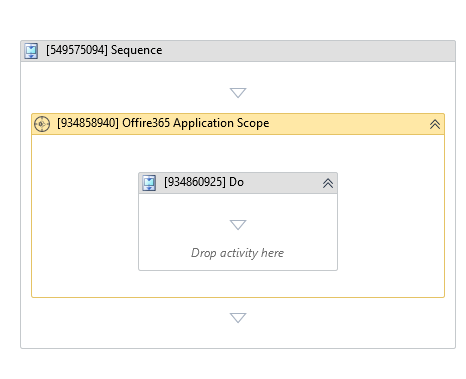
(*For mandatory)
For a step-by-step guide on setting up credentials and connecting to Office 365, see Connecting to Office 365.
In the Body of the Activity
- Do - The container block where you place the Office 365 activities that will share this connection context.
Properties
Authentication
-
Application Id:
InArgument<String>* - The Azure application (client) ID of your registered Microsoft Entra application. Required for all authentication types. -
Authentication Type: AuthenticationType - The method used to authenticate with Microsoft Office 365. Default:
InteractiveToken. Select one of the following values:Value Description InteractiveToken(default)Opens a browser popup for the user to sign in interactively with their Microsoft account. IntegratedWindowsAuthenticationAuthenticates using the current Windows user's credentials (Windows SSO). Requires the machine to be domain-joined and a Tenant ID. UsernameAndPasswordAuthenticates using a stored Office 365 username and password. Requires Tenant, Username, and Password (or Secure Password). MFA must be disabled on the account. ApplicationIdAndSecretAuthenticates as the registered application using a Client Secret. Designed for unattended automation. Requires Tenant and Application Secret (or Secure Application Secret). ApplicationIdAndCertificateAuthenticates as the registered application using a certificate. The most secure unattended option. Requires Tenant, Certificate As Base64, and Certificate Password (if protected). -
Services: MicrosoftService* - The Microsoft 365 services that this scope is authorized to access. Select one or more of the following values (cannot be
Unselected):Value Service Accessed FilesOneDrive and SharePoint file operations (Upload, Download, Copy, Move, Delete, etc.) MailOutlook mailbox operations (Send Mail, Get Mail, Move Mail, etc.) CalendarOutlook calendar operations GroupsMicrosoft 365 Groups operations SharedAccess to shared resources across services (e.g. shared mailboxes, shared calendars, SharePoint sites) -
Tenant:
InArgument<String>* - The Azure directory (tenant) ID or tenant domain name (e.g.,yourcompany.onmicrosoft.comor a GUID).- For
InteractiveToken, if left blank, the scope defaults to thecommonendpoint. - For
IntegratedWindowsAuthentication,UsernameAndPassword,ApplicationIdAndSecret, andApplicationIdAndCertificate, Tenant is mandatory.
- For
-
Environment: HostingEnvironment - The Microsoft cloud environment to connect to. Default:
Global. Options includeDefault,Global,China,Germany,USGovernment,USGovernmentDOD. Change this only if your organization uses a sovereign or national cloud deployment. -
OAuth2 Username:
InArgument<String>- The Office 365 email address of the user. Used byInteractiveTokento pre-fill the username in the authentication prompt.
Application Certificate And Secret
These properties apply when Authentication Type is set to ApplicationIdAndCertificate.
-
Certificate As Base64:
InArgument<String>* - The content of the.pfxcertificate file encoded as a Base64 string. Required forApplicationIdAndCertificate. -
Certificate Password:
InArgument<SecureString>- The password protecting the certificate file, stored as aSecureString.
Application ID And Secret
These properties apply when Authentication Type is set to ApplicationIdAndSecret.
- Application Secret:
InArgument<String>* - The Client Secret string generated in your Azure app registration. Required if Secure Application Secret is not provided.
Secure Application Secret
These properties apply when Authentication Type is set to ApplicationIdAndSecret.
- Secure Application Secret:
InArgument<SecureString>* - The Client Secret stored as aSecureStringvariable for enhanced security. Required if Application Secret is not provided.
Username And Password
These properties apply when Authentication Type is set to UsernameAndPassword.
-
Username:
InArgument<String>* - The Office 365 email address of the account (e.g.,robot@yourcompany.com). Required forUsernameAndPassword. -
Password:
InArgument<String>* - The account password as plain text. Required if Secure Password is not provided. -
Secure Password:
InArgument<SecureString>* - The account password stored as aSecureStringvariable. Required if Password is not provided.
Common
-
Continue On Error:
InArgument<Boolean>- Specifies whether execution should continue if this activity throws an error.True: The workflow continues executing the next activity even if an error occurs within the scope.False(default): The workflow stops and reports the error.
-
Timeout:
InArgument<Int32>- The maximum time, in milliseconds, to wait for authentication and Microsoft Graph API requests before throwing a timeout error. Default:30000ms (30 seconds) if unset or<= 0.
Misc
- Display Name (
String) - The display name of this activity in the workflow designer. You can rename it to make your workflow easier to read. Default:Office365 Application Scope.
See Also
- Connecting to Office 365 - Step-by-step guide to registering an Azure application and setting up authentication.
- Outlook mail activities - Send Mail, Get Mail, Move Mail, Delete Mail, Forward Mail and Replay To Mail. Require the
Mailservice in the scope.