Forward Mail
RCA.Activities.Office365.ForwardMail
Description
The Forward Mail activity forwards an existing email message to one or more recipients using Microsoft Office 365 Outlook.
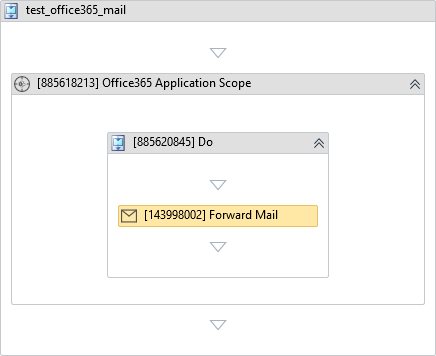
note
This activity must be placed inside the Do block of Office 365 Application Scope with the Mail service selected. See Connecting to Office 365 for how to set up authentication and permissions.
(* is mandatory)
In the body of activity
- None (Configure properties via the Properties panel).
Properties
Common
- Continue On Error (Boolean) - A Boolean variable has two possible values: True or False
- True : allows the rest of the process to continue the execution even if an error occurs within the activity.
- False : blocks the process from continuing the execution.
Input
- Account (String) - The email account used to forward the message.
- Body (String) - Additional message body content to add when forwarding the email.
E.g: "Please see the forwarded email below." - Message (Office365Message)* - The Office365Message object to be forwarded.
- New Subject (String) - A new subject line for the forwarded email. If left blank, the original subject is kept (prefixed with FW:).
E.g: "FW: Monthly Report"
Recipients
- To (String[])* - An array of email addresses for the primary recipients.
E.g:{"teammate@example.com"} - CC (String[]) - An array of email addresses for carbon copy recipients.
- BCC (String[]) - An array of email addresses for blind carbon copy recipients.
Attachments
- Attachments (
List<String>) - Additional file paths to attach to the forwarded email. - Attachments Collection (
IEnumerable<String>) - An IEnumerable collection of file paths to attach. - Replace Existing (Boolean) - If True, replaces existing attachments on the email with the new attachments. Default value: False.
Options
- Is Draft (Boolean) - If True, saves the forwarded email as a draft without sending. Default value: False.
Misc
- Public (Checkbox) - Check if you want to public the activity. Remember to consider data security requirement before using this property.
- Display Name (String) - The name of this activity. You can edit the name of the activity to organize and structure your code better.
E.g: Forward Mail